Free AI skills for project managers and team leads
Paste a meeting transcript, and your AI agent writes the minutes, logs the decisions, lists who does what by when and builds the next agenda from what is still open. Seventeen free skills keep the records a project manager keeps, in the same formats as our templates.
 Igor Ushakov, founder of NumalUpdated 7 min read
A launch week with the skills
The demo project in the repository is the launch of a new onboarding flow, run by a product manager called Maya. This is her week. Each step links to the full example: what she said, what the agent answered and which files it wrote.
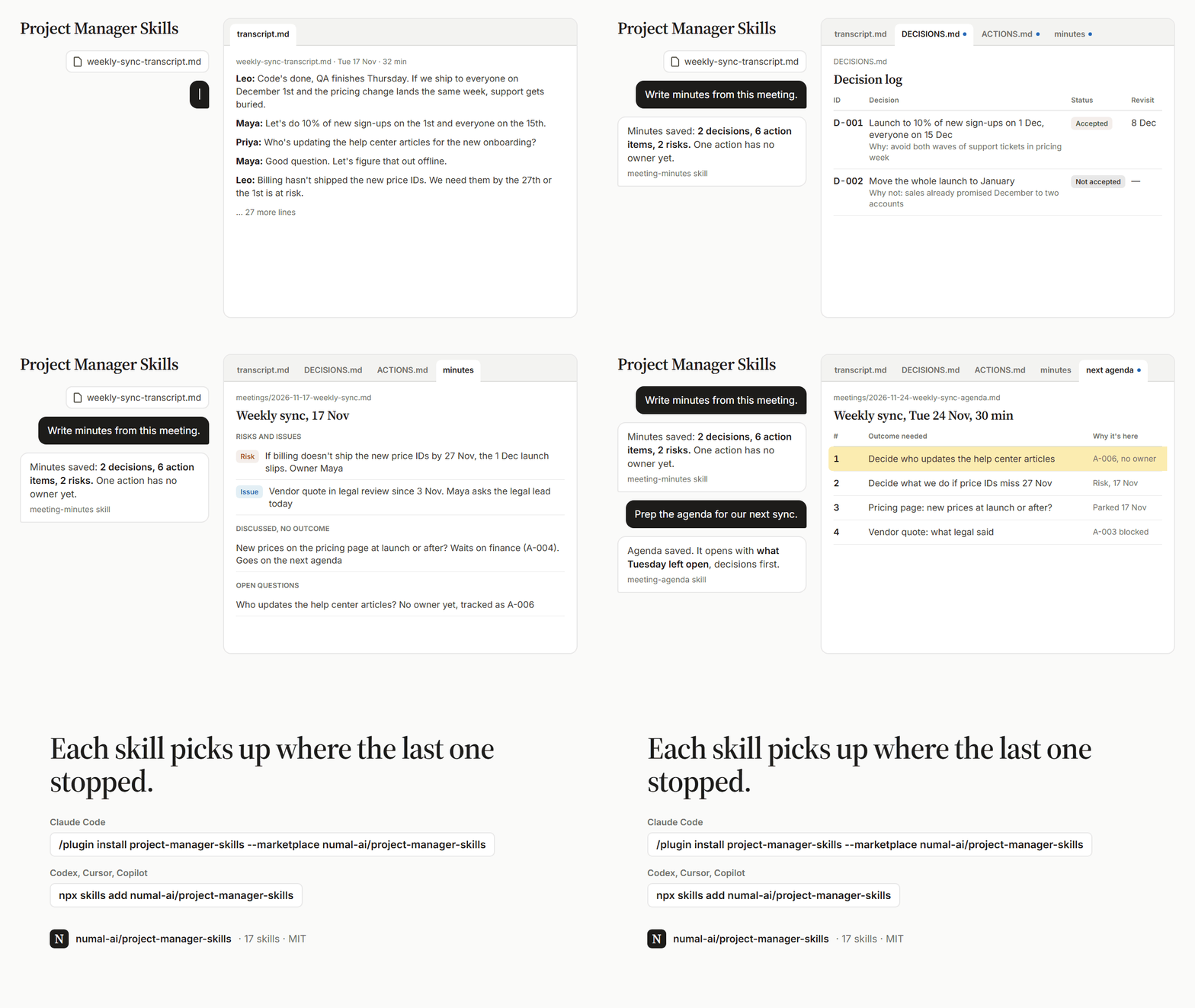
- Tuesday, after the weekly sync.
Write minutes from this meeting.
Out of a 32-minute transcript come the minutes, the staged launch as decision D-001 with its reason, and six actions. One has no owner: who updates the help center articles. See the example - Wednesday, 08:30.
Brief me.
Six open actions shrink to three lines: two things to decide, one person to unblock, and what to walk out of each meeting with. See the example - Friday.
Write my Friday status update for stakeholders.
One page for a VP and the sales lead: Green, with the single day of margin on billing called out and a short watch list. See the example - Friday, for next Tuesday.
Prep the agenda for our next sync.
It opens with the item nobody owned on Tuesday, then what to do if billing is late. Each item says what has to be decided, by whom and in how many minutes. See the example
The rest of the project, from the kickoff charter to the lessons after launch, is in the demo on GitHub.
Get them in a minute
claude.ai and Claude Cowork
- Download the starter pack (meeting minutes, meeting agenda and status report) or all seventeen, and unzip it.
- Upload the skill ZIPs inside it in Customize → Skills, one at a time. Not the pack itself.
- Open a new chat and paste your last meeting’s notes:
Write minutes from this meeting.
Claude Code
/plugin install project-manager-skills --marketplace numal-ai/project-manager-skills
Codex, Cursor, GitHub Copilot and other agents
npx skills add numal-ai/project-manager-skills
One skill at a time, an install by hand, and what the skills cost in tokens: the repository has every way.
The same records as our templates
Six of the skills keep a record that we also publish as a template to fill in by hand. The columns and the IDs are the same, so you can start on paper and hand the record to your agent later, or the other way round.
| Template | Skill | What the agent does with it |
|---|---|---|
| Meeting recap | meeting-minutes | Writes this recap from your transcript or notes, with a message ready to send |
| Action items | action-items | Keeps this list across your meetings and drafts the follow-ups |
| Decision log | decision-log | Keeps this log from your meeting notes and answers “why did we decide that?” |
| RAID log | raid-log | Keeps this log from your weekly notes, each risk with an owner |
| Project status report | status-report | Writes this report every Friday from your project’s records |
| One-on-one meeting | one-on-one | Preps each 1:1 from last time’s notes, in a private doc per person |
All seventeen, by moment
Meetings
-
Meeting agenda
meeting-agendaYour next agenda, built from what is still open: late actions, decisions due for a second look, what the last meeting left. Each item says what the meeting has to decide.
Say
Prep the agenda for tomorrow’s sync
-
Meeting minutes
meeting-minutesMinutes from a transcript or rough notes: what was agreed and what was turned down, who does what by when, and a short recap you can post.
Say
Write minutes from this transcript
To fill it in by hand: meeting recap template
-
Action items
action-itemsEvery promise from every meeting in one list, with what is late and a friendly nudge for each. Turns them into tracker tickets once you confirm.
Say
What’s overdue, and whom do I chase?
To fill it in by hand: action items template
-
Standup
standupReads the async standup thread and leads with who is blocked and who can unblock them.
Say
Summarise today’s standup thread
Records and reports
-
Decision log
decision-logAnswers “why did we decide that?” with the decision, who made it, the reason and the meeting it came from. Spots decisions that contradict each other.
Say
Why did we pick a staged launch?
To fill it in by hand: decision log template
-
RAID log
raid-logRisks, assumptions, issues and dependencies, each with an owner and a plan that is more than “monitor”, and what changed since last week.
Say
Update the RAID log from this week’s notes
To fill it in by hand: raid log template
-
Change control
change-controlWhen someone asks for more, it writes down what that costs in scope, dates, money and people. The plan changes only after the person who decides says yes.
Say
Sales wants bulk import in v1. Write a change request with the impact
-
Status report
status-reportYour Friday update from the project’s records, with a red, amber or green you can defend. Several projects roll into one page.
Say
Write my Friday update for stakeholders
To fill it in by hand: project status report template
-
Morning brief
morning-briefWhat needs you today, on one page: what to decide, whom to unblock, what to walk out of each meeting with. It only reads.
Say
Brief me
Starting and closing a project
-
Project charter
project-charterTurns the kickoff into a charter: the goal, how you will know it worked, what is in and out, the milestones and who decides.
Say
Write the project charter from this kickoff transcript
-
RACI matrix
raci-matrixWho does, decides, advises and hears about each piece of work, one accountable person per row, built from what people actually do.
Say
Who’s accountable for the rollout dates?
-
Stakeholder map
stakeholder-mapWho cares about the project and how much sway they have, and who should hear what, how and how often.
Say
Who needs to hear that billing is late?
-
Retrospective
retrospectiveA retro or post-mortem built on what actually happened, ending in a few actions with owners that the next retro checks.
Say
Plan our sprint retro from these notes
-
Lessons learned
lessons-learnedKeeps what the team learned and the closure report, and brings the right lessons up when a similar project starts.
Say
Have we run a launch like this before? What did we learn?
People and the team
-
One-on-ones
one-on-onePrep for 1:1s with your reports or your manager from what was said and promised last time. A private doc per person.
Say
Prep my 1:1 with Sam tomorrow
To fill it in by hand: one-on-one meeting template
-
Skip-level meetings
skip-level-meetingFor managers of managers: prep for skip-levels, private notes, and themes for your leads without names.
Say
Prep my skip-level with Sam tomorrow
-
Team charter
team-charterYour team’s charter and working agreements, in the team’s own words. The retro checks that they still hold.
Say
Write up our team charter from this how-we-work talk
What they won’t do
- Send, post or create anything on their own. Recaps, nudges and tracker tickets are shown to you first as an exact list, and go out on one yes.
- Change your plan. Dates, budget and scope move only when the person who decides says so. The change-control skill prepares the request.
- Fill gaps with guesses. An owner or a date that nobody said becomes a question, or is marked
(check). - Share private notes. 1:1 and skip-level notes stay in their own files, and themes leave a skip-level without names.
- Phone home. No servers, no accounts, no telemetry: the skills are instructions plus Markdown files.
Or let the records keep themselves.
The skills work when you ask, on what you paste in. Numal does the same after every team call without being asked: the decisions go on record, the context lands in the right tracker tasks once you approve, and every manager starts the day with a brief. It works across all of a company’s teams.
See how a sync becomes tasks- Free for one manager on one board
- No card needed
Questions
What is a Claude skill?
A folder with a SKILL.md file: instructions, and sometimes examples, that the agent loads when your request matches the skill’s description. Until then only the name and the description sit in the agent’s context, so installing many skills costs little.
Are these skills free?
Yes. They are open source under the MIT license, on GitHub. There is no account, no server and no telemetry: just instructions and the Markdown files they keep in your folder.
Do I need to know how to code?
No. In claude.ai or Claude Cowork you download a ZIP, upload the skills in Customize → Skills and then talk to Claude as usual. The terminal commands are for people who already work in Claude Code, Codex or Cursor.
Which tools do they work in?
Claude (claude.ai, Cowork and Claude Code), OpenAI Codex, Cursor, GitHub Copilot, Gemini CLI and other tools that read the open Agent Skills format. They need no other software.
Do they work with Jira, Linear or Asana?
When your tracker is connected to your agent, the action-items skill creates tickets with the meeting context after you confirm the list, and the morning brief reads what changed. Without a tracker, everything lives in the Markdown files.
How are the skills different from the templates?
They use the same formats. You fill a template by hand; with a skill, the agent fills it in from your transcript and keeps it up to date from meeting to meeting.
How is this different from Numal?
The skills run in your agent when you ask, on what you paste. Numal runs by itself after every call, for every team, and writes into the tracker after you approve. You can start with the skills and move to Numal when pasting transcripts gets old.
The same records, to fill in by hand
- TemplateMeeting recap templateThe short follow-up after a meeting: what was decided, who does what, what is still open. Email and Slack versions.
- TemplateDecision log templateA running record of what the team decided, who decided it and why, with the five rules that keep it true.
- TemplateAction items template and trackerOwner, due date, status and where it came from: a template and a running tracker for meeting action items.
- TemplateRAID log templateRisks, assumptions, issues and dependencies in one place: what each means, a template, and a filled-in log.
- TemplateProject status report templateA one-page weekly status: overall state, what moved, what slid, what’s at risk, what you need. With a filled-in report.
- TemplateOne-on-one meeting templateA running 1:1 doc that puts their topics first, keeps status out, and carries actions from week to week.